
Analysing a macro-enabled Word attachment (.docm) from a simulated phishing email, on a lab machine with no outbound internet access. Objective: extract the flag, but where could it be?
The Scenario and the Triage
I am presented with a lab machine with a suspicious looking .docm file. Immediately this means "macro". I have recently been learning about techniques in analysing suspicious files, and specifically macro extraction. So let's explore with olevba - a tool to extract macros from OLE files.
I also note no outbound internet access on the machine, olevba not installed, so let's get the suspicious file somewhere we can work.
Move the Artefact, not the Tool
The lab machine and my attack box can see each other, let's spin up a webserver and serve the file.
On the lab machine, in the mrphisher directory:
python3 -m http.server 8000
From my attack box:
wget http://<lab-box-ip>:8000/MrPhisher.docm
The macro
Let's go ahead and install the tooling:
Note: I am using the TryHackMe attack box for this exercise, which doesn't have olevba installed. if you are using your own instance of Kali or similar, you might be ok to skip this bit if you already have the tooling.
pip3 install oletools
Now we have the tooling, let's point at the file:
olevba MrPhisher.docm
olevba 0.60.2 on Python 3.8.20 - http://decalage.info/python/oletools
===============================================================================
FILE: MrPhisher.docm
Type: OpenXML
WARNING  For now, VBA stomping cannot be detected for files in memory
-------------------------------------------------------------------------------
VBA MACRO ThisDocument.cls
in file: word/vbaProject.bin - OLE stream: 'VBA/ThisDocument'
- - - - - - - - - - - - - - - - - - - - - - - - - - - - - - - - - - - - - - -
(empty macro)
-------------------------------------------------------------------------------
VBA MACRO NewMacros.bas
in file: word/vbaProject.bin - OLE stream: 'VBA/NewMacros'
- - - - - - - - - - - - - - - - - - - - - - - - - - - - - - - - - - - - - - -
Sub Format()
Dim a()
Dim b As String
a = Array(102, 109, 99, 100, 127, 100, 53, 62, 105, 57, 61, 106, 62, 62, 55, 110, 113, 114, 118, 39, 36, 118, 47, 35, 32, 125, 34, 46, 46, 124, 43, 124, 25, 71, 26, 71, 21, 88)
For i = 0 To UBound(a)
b = b & Chr(a(i) Xor i)
Next
End Sub
+----------+--------------------+---------------------------------------------+
|Type      |Keyword             |Description                                  |
+----------+--------------------+---------------------------------------------+
|Suspicious|Chr                 |May attempt to obfuscate specific strings    |
|          |                    |(use option --deobf to deobfuscate)          |
|Suspicious|Xor                 |May attempt to obfuscate specific strings    |
|          |                    |(use option --deobf to deobfuscate)          |
+----------+--------------------+---------------------------------------------+
Interesting - nothing in plain sight. Tool suggests using option --deobf to deobfuscate, let's give that a try.
Nope, same output. What is that Array in the code? An integer array, plus Chr, plus XOR against a counter. Classic obfuscation technique (apparently - more on this later!)
The road to plain text
I am a beginner on this journey (check out my About Me if you haven't already.) I know Python can do this, but I have been playing a lot with CyberChef lately. Can this help me decode?
We are looking at a loop, with each variable in the string obfuscated based on its position in the array.
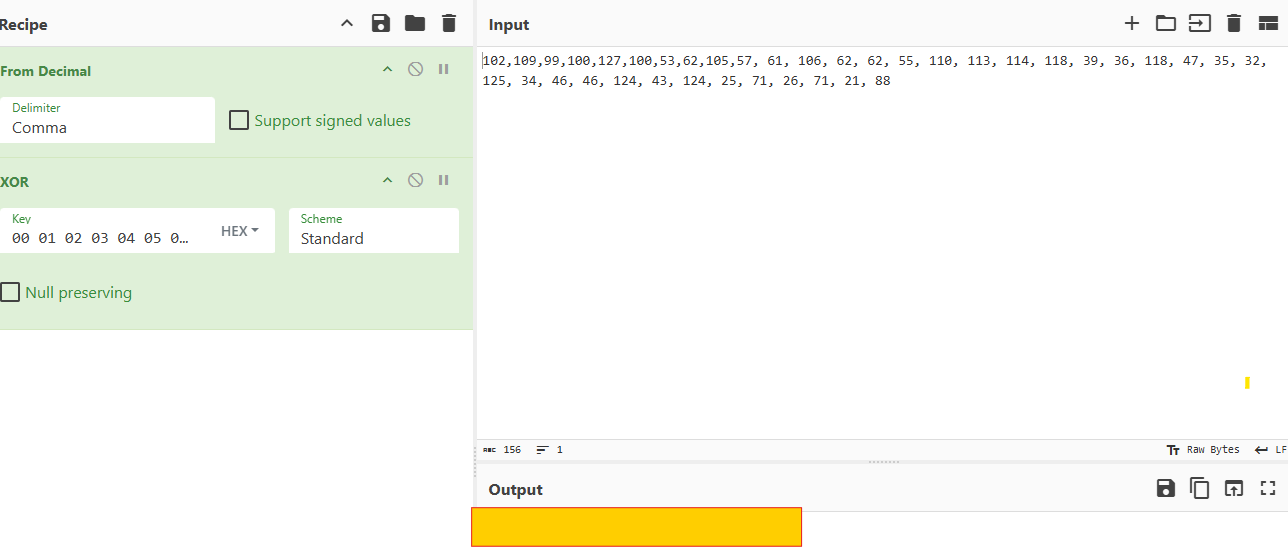
Therefore each byte must be XORed against its own array index. In CyberChef, I need to paste the array to the Input area, delimited by comma. The recipe is to:
"From Decimal" to convert from decimal back to raw form.
XOR with a HEX key.
That key is byte for byte equal to the length of the data. So I just (just - ha - this took me an age to work out) need to count from00:
00 01 02 03 04 05 06 07 08 09 0A 0B 0C 0D 0E 0F 10 11 12 13 14 15 16 17 18 19 1A 1B 1C 1D 1E 1F 20 21 22 23 24 25
This gives me the flag in the Output area:
Lessons, and why did --deobf not work?
The Array + Chr + Xor-with-counter was new to me as an amateur in this space, and took some research for me to decode, as well as thinking back to my university coding days. My research taught me this trio is quite well known as a technique for obfuscation, and I commit this to my memory:
Integer arrays + Chr() signals encoded strings
XOR with a loop counter is the positional, not-repeating, key. I finally figured out that CyberChef will work through the key in step with the data. Given the key is just the position of the data in the array, we know we can get the flag this way:
Index:   [0]   [1]   [2]   [3]   [4]   [5]   [6]   [7]  ...
Data:    102   109    99   100   127   100    53    62  ...
XOR key:  00    01    02    03    04    05    06    07  ...
         ----  ----  ----  ----  ----  ----  ----  ----
Result:  102   108    97   103   123   125    51    57
Char:    REDACTED (this is the flag ;))
The
olevbatool can help deobfuscate static code (using the flag--deobf.) It works on constant expressions only. It failed this time because static analysis cannot evaluate runtime state. A loop variable changes each iteration, which static analysis cannot solve without emulation. I could have run the macro in LibreOffice (perfectly safe in a lab environment, maybe not on a real engagement!), but I really wanted to find another way.
An enjoyable room for sure!
About the author
- Twenty years asking the technical questions. Now learning to answer them myself. Documenting the journey. @lateescalation.com
Comments
Join the discussionNo comments yet. Be the first to comment.